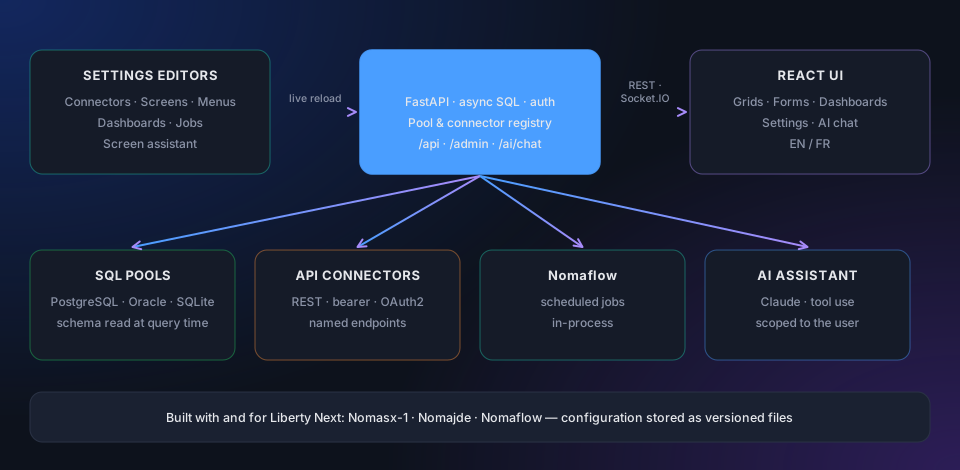
Configuration describes the data sources — the framework discovers the rest at runtime. Connectors, screens, menus and dashboards are built in the Settings editors — or in one pass with the Screen Creation Assistant; the React UI then builds a typed grid, a filter row, a modal form and lookups from the columns the query actually returns. No schema duplication, no per-screen code.
How it works
Define a connector in the editors, expose its queries to a screen or a dashboard, and the framework renders everything else — grid, dialog, filters, auth, role pruning, export buttons, audit columns, the assistant and scheduled jobs.
The grammar
Everything the framework does composes from five primitives. Once you’ve read these five, the framework’s surface is essentially mapped.
A connection to a database — a SQLAlchemy URL plus credentials.
“How do I reach this data?”
A named set of queries or REST endpoints on top of a pool.
“What questions do I want to ask this source?”
A grid + edit dialog over a connector’s queries.
“How do I let a person look at this and edit it?”
A layout of KPIs and charts over the same queries.
“How do I summarise this for the headline view?”
The sidebar tree that organises screens and dashboards into an app.
“How do I make this navigable?”
Around the five sit the supporting layers: the dictionary for labels and formats, auth & roles for who-sees-what, Nomaflow for scheduled work, the AI assistant and Python plugins.
Schema-discovered, not schema-declared
Nothing about your data is duplicated in framework configuration. The connector knows the query; the database knows the columns. When a column changes, the UI reflects it on the next reload.
Use cases
CRUD over existing tables, role-gated, with a sensible default UX. From “I have a database” to “users are using it” in about a day.
KPIs and charts over named SQL queries. Shared filter bar, drill-down to grids, PDF export — no separate BI tool for the 80% case.
A modern UI over JD Edwards, SAP or NetSuite — users, security, BIP queue, master data. Gives operators a faster way to live in the ERP.
A UI on top of webhook receivers, scheduled syncs and ETL pipelines. Nomaflow runs the jobs; the framework renders the runs.
A scoped slice of an internal app exposed to outside users via OIDC. Row-level access, audit trail and file uploads, all framework-native.
Approve / reject / route — multi-step forms, status workflows, scheduled escalations. Form conditions handle the per-state UX.
The right tool when most of your screens are list-and-edit on top of a database, with sprinklings of dashboards, jobs and integrations — which describes the vast majority of internal applications.
Built-in AI
Liberty Next ships a Claude assistant with tool use. Every SQL query and HTTP endpoint the signed-in user may run becomes a tool, with a JSON schema generated from the query parameters and a description taken from the connector and the dictionary. Ask “which suppliers were paid late last month?” and the assistant picks the query, runs it with your permissions and answers with the figures.
No API key, no AI call — every other feature keeps working. Model, token budget and daily limits are set in the App settings.
Permission-scoped
The framework checks the user’s right on the connector before every tool call — a tool the user cannot run is never offered.
Read-only by default
Write queries are excluded unless the connector sets expose_to_ai and the role holds the matching ai:tool permission.
Bounded
Tool calls per turn, tokens per conversation and messages per day are capped and shown in the chat.
Shareable
Conversations are kept per user and can be shared as a read-only link to hand an investigation over.
Vendor applications
The framework itself is free and open source. A license key (an RS256-signed JWT) unlocks the bundled vendor products that ship on top of it.
Enterprise security, Object Usage Tracking, Oracle & JD Edwards licence compliance and Segregation of Duties — one audit-ready platform.
Master data, security maintenance, transactions and BIP reporting on one searchable grid. SQL + AIS API, no fat-client ping-pong.
Cron jobs, ETL pipelines, LDAP sync and HTTP fan-out with retry, run history and a live log tail — in-process, on the same connectors and permissions.
Under the hood
React 19 + Vite + TypeScript, built once and served static by the backend on the same port. Dark default with a light theme swap, react-i18next EN / FR, @tanstack/react-table for the grid, react-markdown for the assistant, Monaco for in-app editing. You don’t write any of it — the framework renders everything off the configuration.
Python 3.12, FastAPI, SQLAlchemy 2.0 async with asyncpg (PostgreSQL), oracledb (Oracle, thin) and aiosqlite (SQLite), the Anthropic SDK for the AI assistant, authlib for OIDC, Argon2 for hashing, AES-256-GCM field encryption, APScheduler for cron jobs, Socket.IO for live updates. One process, one port, no companion daemons.
FAQ
Liberty Next is an open-source, connector-driven low-code framework published by Nomana-IT. You connect a SQL or API source and build connectors, screens, menus and dashboards in the built-in Settings editors and the Screen Creation Assistant; the React UI then builds the typed grid, filter row, edit dialog, lookups and dashboards from the columns the query actually returns, with no per-screen code. The configuration is stored as plain TOML files, so it can be versioned and promoted between environments.
Yes. The framework is free and open source. Nomasx-1, Nomajde and Nomaflow are applications built with and for it; a license key (an RS256-signed JWT) unlocks the licensed vendor applications.
Liberty Next connects to PostgreSQL, Oracle Database and SQLite through SQLAlchemy async pools, and to REST services through HTTP and API connectors. The schema is discovered at runtime from the live query.
The built-in assistant uses Anthropic Claude with tool use. Every SQL query and HTTP endpoint the signed-in user may run becomes a tool; the framework checks the user’s permission before each call, and write queries are excluded unless explicitly exposed to the AI and granted per role.
Yes. ERP administration is one of its main use cases: Nomajde (the JD Edwards companion) and Nomasx-1 (security, licences and Segregation of Duties) are both built on Liberty Next, with Nomaflow for scheduled jobs.
One Python process serves the API and the React UI on one port, deployed with systemd, Docker or Kubernetes on your own servers or in your cloud — or hosted by Nomana-IT on Oracle Cloud Infrastructure (OCI) or AWS.
Liberty Next is free and open source. Try the live demo, read the docs, or deploy your own instance.